Trimmy
Trimmy is a small CLI-launched desktop app for making vertical split-crop videos.
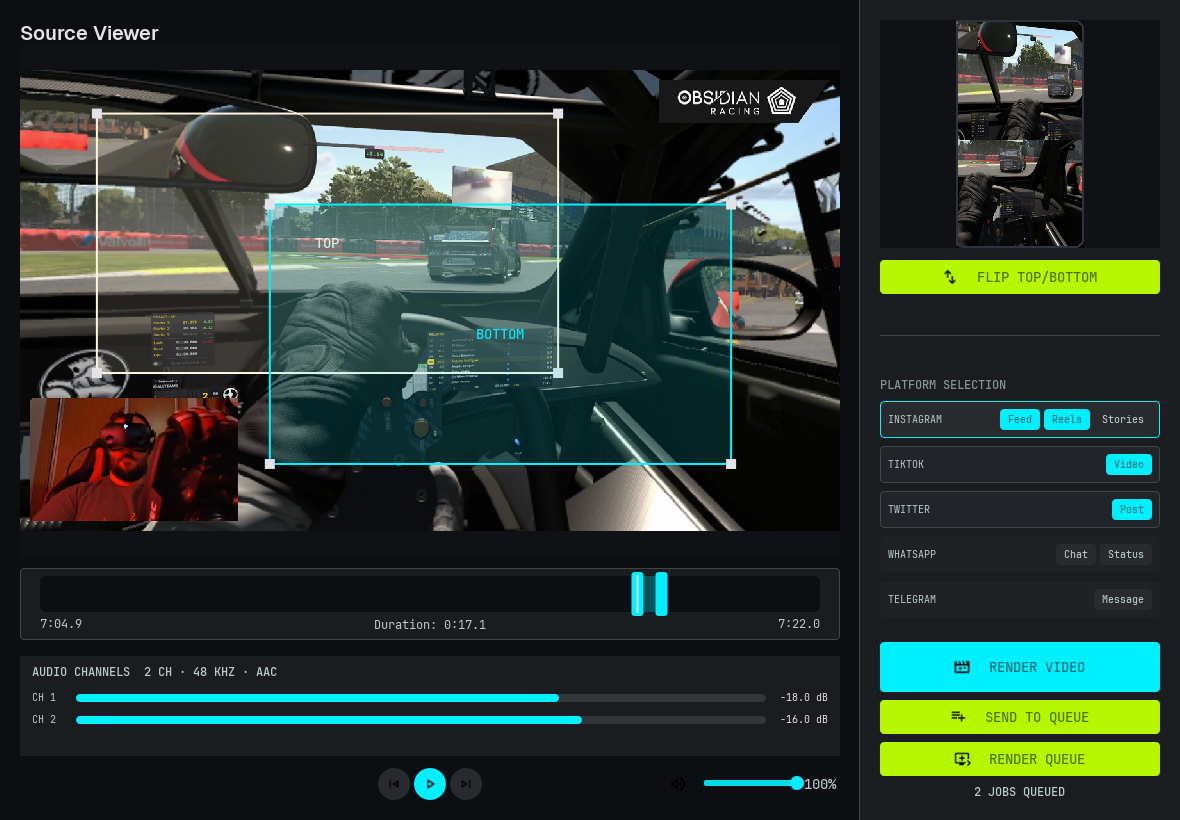
You give it a regular widescreen video. Trimmy lets you pick two crop regions, stack them top and bottom, trim the timeline, and render a ready-to-upload 9:16 video for Reels, TikTok, Shorts, WhatsApp, Telegram, and X.
trimmy "E:\musan\Videos\2026-06-08 23-52-54.mkv"
The idea
Most social platforms want vertical video.
But a lot of useful source footage is still horizontal: gameplay plus facecam, screen recordings, tutorials, interviews, code walkthroughs, and demos. Trimmy is for the common edit where you want two important areas from that horizontal frame, stacked vertically.
Pick two areas
Move the TOP and BOTTOM crop boxes over the parts of the source video you want to keep.
Trim the moment
Set the start and end points from the timeline or from the keyboard.
Render for the platform
Choose one or more platform targets and let ffmpeg encode the output.
Install
pip install trimmy
Or run it without installing:
uvx trimmy
Tip
Trimmy needs ffmpeg and ffprobe available on your PATH.
Next steps
Start with the tutorial to render the included example workflow, or go straight to the CLI reference.